


You do not need to build a miniature data center to begin running artificial intelligence (AI) on your own computer. You need a useful task, software that supports your machine, and a model small enough to leave room for everything else.
“Local” means the model's calculations happen on your machine, rather than a provider's servers. Some applications can do this without an internet connection once their software and model files are downloaded. LM Studio, for example, documents offline chat with downloaded models.[1] That is different from opening a browser window that sends your questions elsewhere.
The useful hardware question is not “Is this an AI computer?” It is “Can this computer run my chosen model, at a useful speed, on the work I actually do?”
A couple points on specifications
Capacity is how much you can keep open. Your computer needs enough working memory for the model, the current task, and its other applications. For example: a larger desk does not make you read faster, but a desk too small creates constant interruptions.
Bandwidth is how quickly material can reach the processor. Even a fast reader waits if pages arrive one at a time through a narrow slot. Memory bandwidth describes the rate at which data moves between memory and processing hardware.
Compute is how quickly the processor can do the calculations. More calculating power helps only when the necessary data can get there and the software can use that hardware.
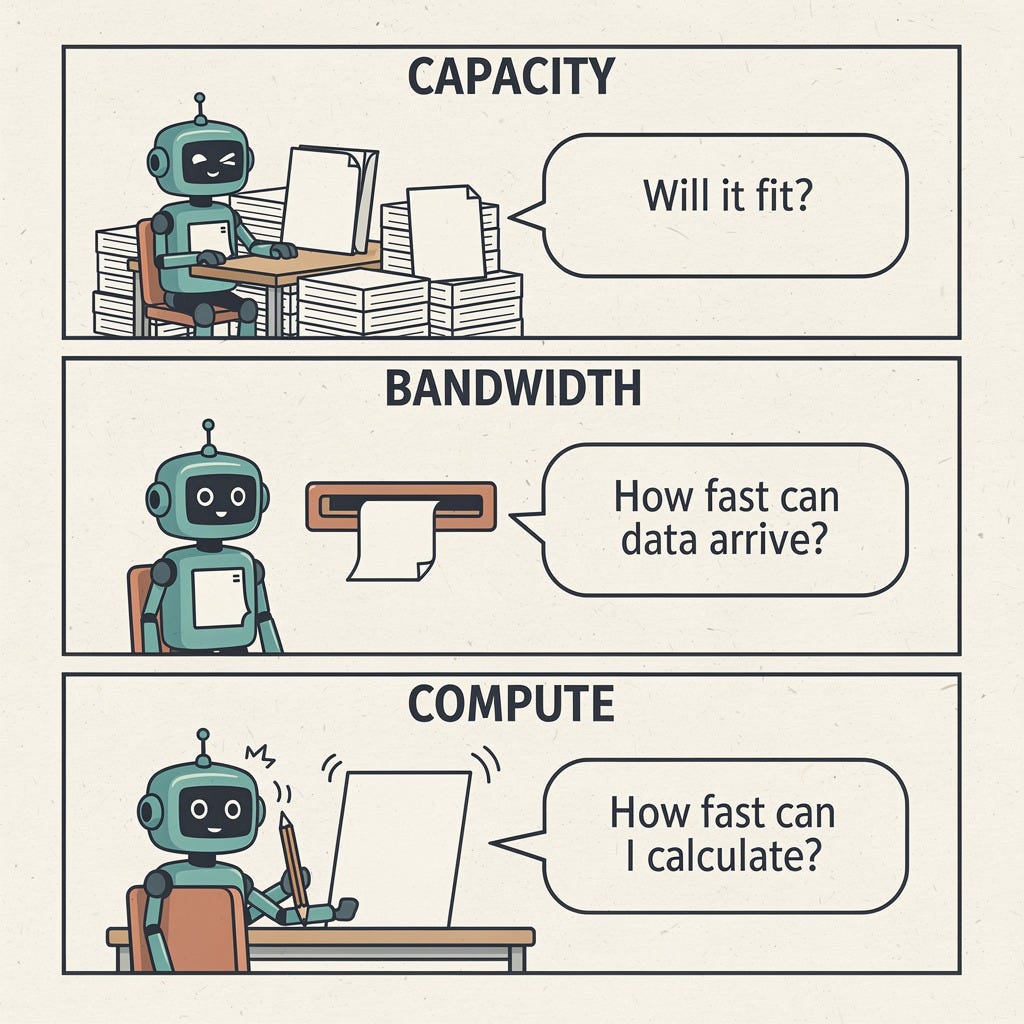
Figure 1. Capacity, memory bandwidth, and compute answer different questions. A larger workspace does not automatically make the worker faster.
Storage is not working memory
Storage is your filing cabinet. A solid-state drive (SSD) holds downloaded models, documents, and applications when the computer is off. Random-access memory (RAM) is the temporary workspace used while programs run.
A large drive lets you keep more models. It does not give a running model an equally large workspace. Moving data between storage and memory can help software handle limited capacity, but it is not equivalent to having enough fast working memory.
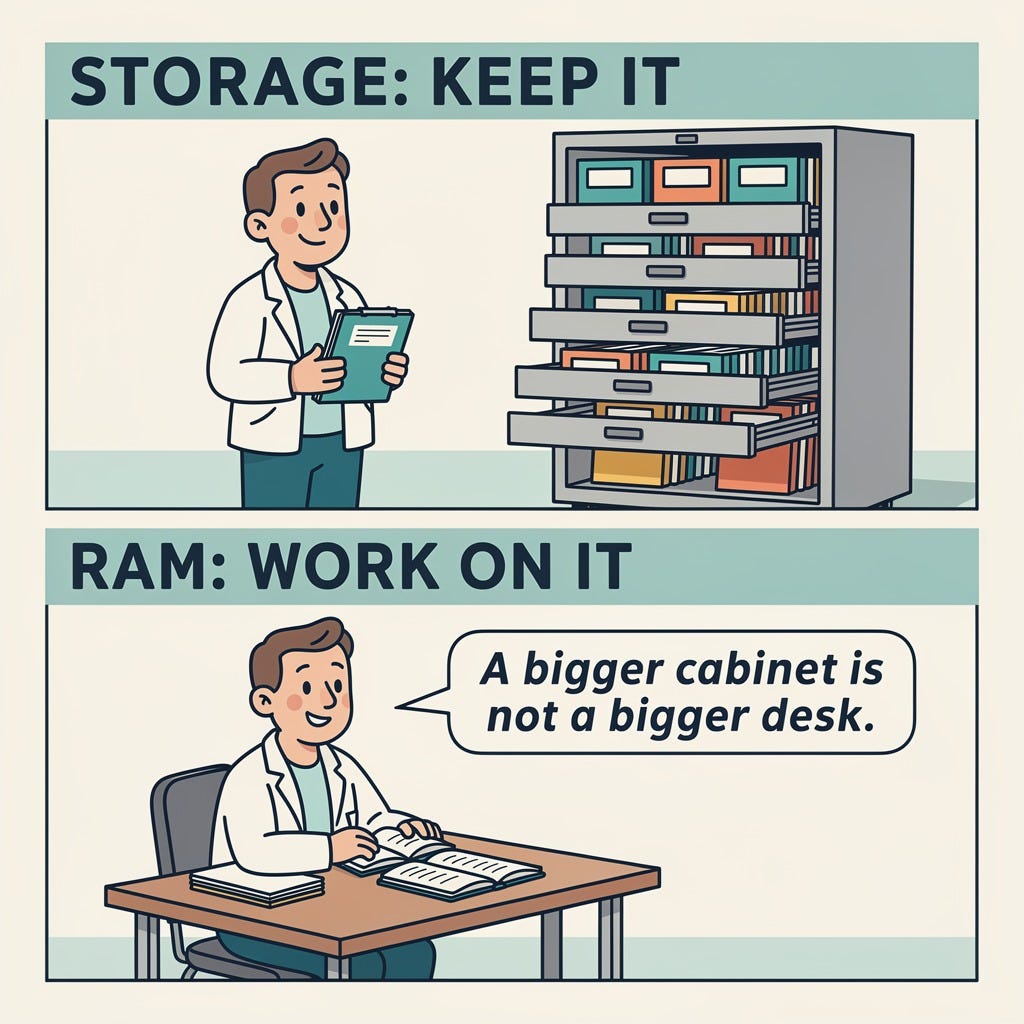
Figure 2. Storage keeps files; RAM provides working space. A bigger filing cabinet is not a bigger desk.
The central processing unit (CPU) is the general-purpose processor that runs the operating system and ordinary applications. It can also run supported language models. A graphics processing unit (GPU) specializes in doing many calculations in parallel. Despite the name, it can accelerate more than graphics. The llama.cpp software project supports both CPU execution and GPU acceleration, including splitting work between them.[2]
You do not need to memorize processor families. You do need to distinguish the memory available to each processor.
How big is a model, really?
A language model's parameters are numerical values learned during training. You will also hear them called weights. A label such as “8B” means roughly eight billion parameters, not eight gigabytes of memory.
Training changes those values. Inference uses an already trained model to produce an answer. Running a downloaded model is inference; it is not training your own model from scratch. A computer that is suitable for one is not automatically suitable for the other.
The space weights occupy depends partly on how precisely each number is stored. Quantization reduces that precision to reduce memory requirements, while trying to preserve useful accuracy.[3] Think of retaining fewer digits in a measurement. The savings can be substantial, but the consequences depend on what was rounded and how.
Here is one transparent, deliberately simplified example:
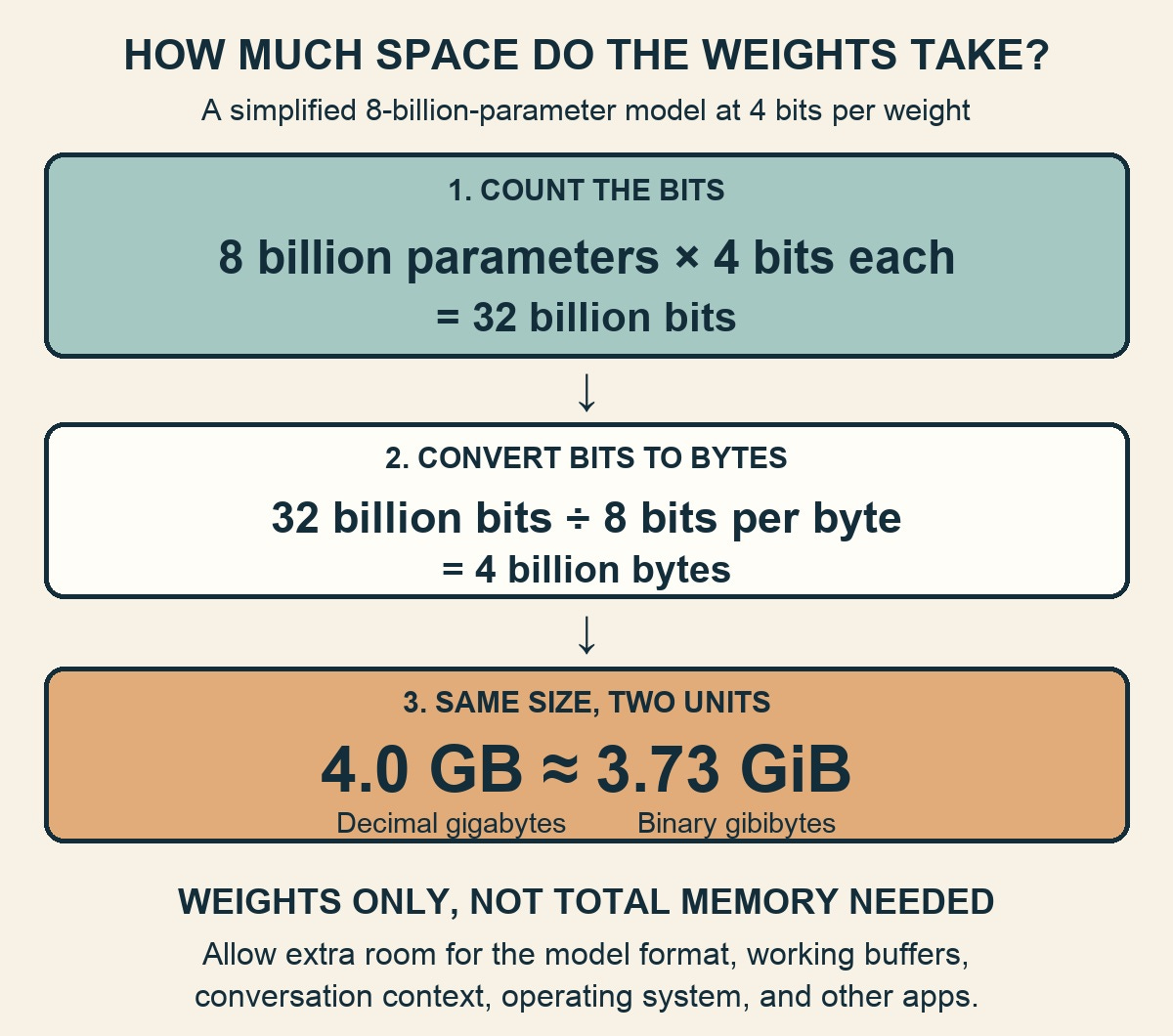
Figure 3. Weight-only arithmetic: 8 billion parameters at 4 bits each occupy 4.0 GB, approximately 3.73 GiB, before runtime overhead.
This is weight-only arithmetic, not a recommendation for a 4 GB computer. Real quantized files include additional information; some values may remain at higher precision. Running the model also needs working buffers, space for the conversation, and memory for the operating system and other applications. The downloaded file's size is a clue, not the total memory requirement.
There is no dependable universal formula that converts a computer's advertised RAM into “the biggest model it can run.” Start with the actual model file, the application's estimate, and the intended workload.
The conversation needs room, too
A model's context is the material available to it for the current response: instructions, documents, conversation history, and generated text, within its supported limits. Text is handled in tokens, which can be words, word fragments, or punctuation.
Many language models maintain a key-value (KV) cache, a working record of intermediate calculations that avoids repeating work. That cache can consume substantial memory as context grows, although the exact behavior depends on the model and caching strategy.[4]
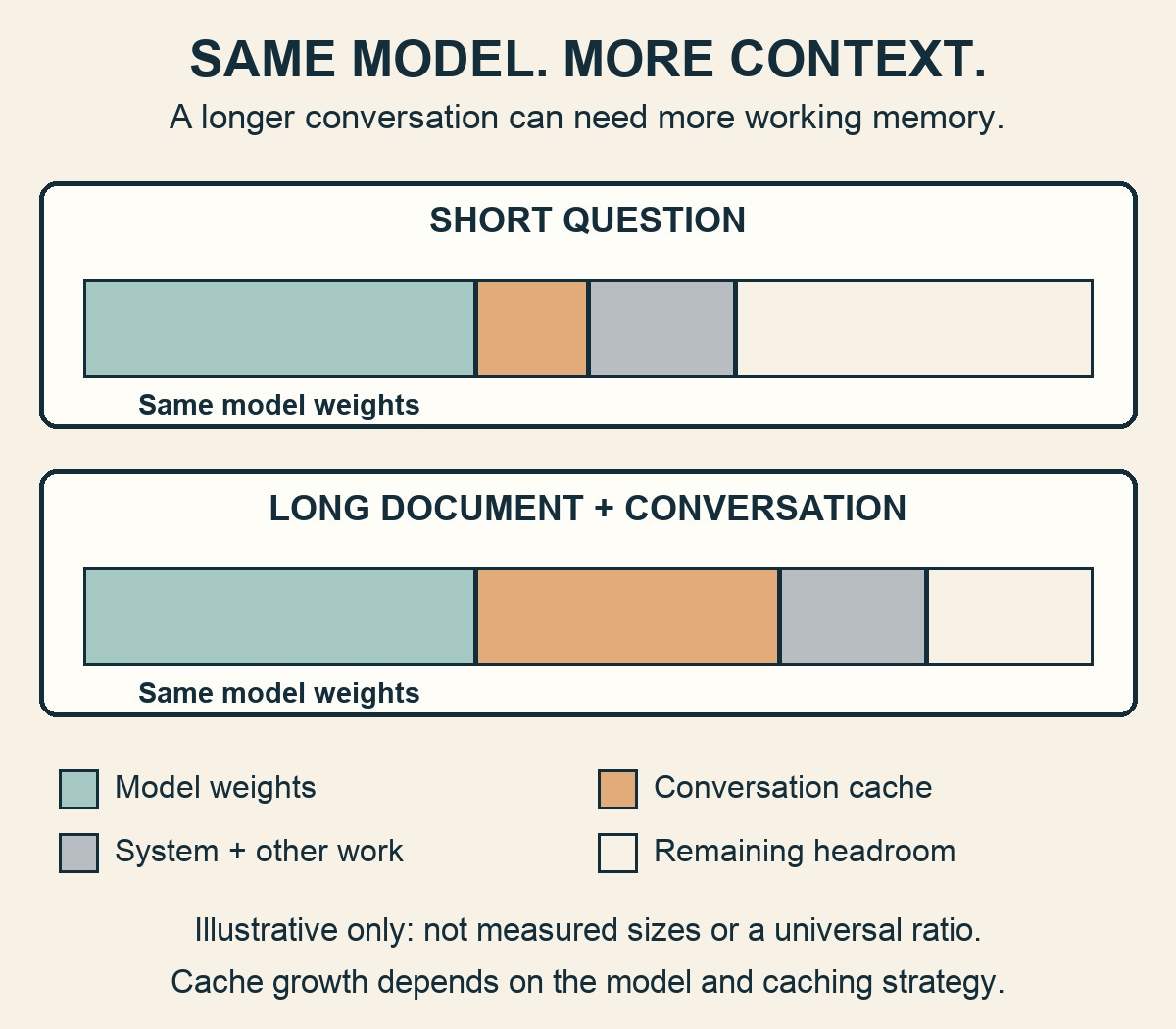
Figure 4. Longer context can enlarge the conversation cache while the model weights stay the same. The proportions are illustrative, not measured.
This explains a common surprise: a model works for a short question but struggles when you attach a long document. The weights have not changed. The workload has.
Do not select the maximum context setting just because the application offers it. Begin with enough for your task. A brief announcement and a lengthy teaching packet are different tests. So are one person chatting and several people making requests at once.
Two kinds of memory arrangements
A desktop with a separate graphics card usually has two relevant memory pools: ordinary system RAM and memory on the graphics card, commonly called video RAM (VRAM). 32 GB of system RAM is not the same as 32 GB of VRAM.
If a model does not fit in the graphics card's memory, supported software may put some work on the CPU instead.[2] That can make the model usable, but it is not the same performance configuration as keeping the work on the GPU.
Some computers instead have an integrated design with shared or unified memory. On Apple silicon, for example, the MLX machine-learning framework lets CPU and GPU operations access shared arrays without copying those arrays between separate memory pools.[5]
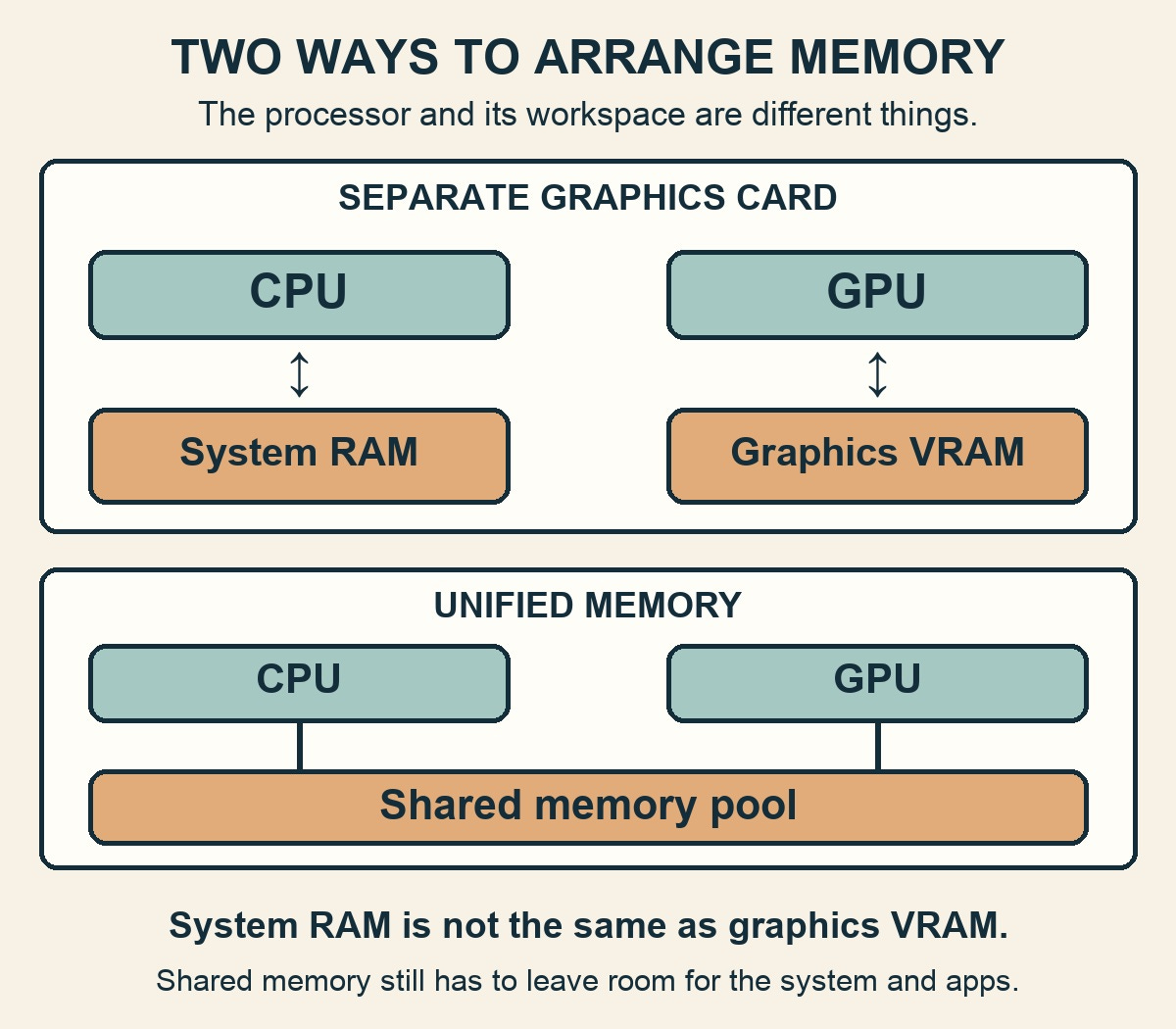
Figure 5. A separate graphics card has its own memory; a unified-memory design gives the CPU and GPU access to a shared pool.
This makes a memory-rich integrated machine worth considering when capacity is the obstacle. But advertised unified memory is not reserved entirely for your model. The operating system, display, and other applications need it too. Shared access also does not mean every integrated system has the same bandwidth or software support.
Bandwidth matters during generation because the processor repeatedly needs data from memory; cache access itself can become a bottleneck.[6] That is why two systems with similar memory capacity can feel quite different. Capacity, bandwidth, and compute belong on the same checklist, not in competition for a single winning specification.
Three labels that can mislead
“Bigger model.” More parameters are not a guarantee of better performance on your task, and they are certainly not evidence of clinical validation. Compare actual outputs, not just model sizes.
Some models use a mixture of experts: different portions of the network handle different tokens. The total parameter count describes the full model; the active count describes the portion used for a particular step. Activating fewer parameters reduces computation, but does not make the other weights vanish from the memory-planning problem.[7] Do not size a purchase using only the smaller active number.
“AI processor.” A neural processing unit (NPU) is specialized hardware for neural-network calculations. Whether your model uses it depends on the application, model, and supported software path. Hardware acceleration requires compatible software, not just a chip on the specification sheet.[8] Ask whether your intended application actually uses that NPU.
Advertised trillions of operations per second, often abbreviated TOPS, are not a directly comparable measure of how quickly your particular assistant will answer. Treat them as a hardware specification, not a reading-speed promise.
“Runs AI.” That might mean recognizing speech, generating text, or creating images. These are different workloads with different models and software. MLX's examples include all three.[5] A successful text-chat demonstration is not a benchmark for the image generator you want to use.
Which computer makes sense?
For a first experiment, an existing laptop is the sensible starting point. Choose a small model supported by your application, keep the context modest, and leave other memory-hungry applications closed. A useful small model is a better introduction than a large one that makes every interaction a waiting exercise.
Tiny computers are better treated as learning projects than default physician workstations. They are not necessarily missing graphics hardware: the Raspberry Pi 5 includes a VideoCore VII GPU.[9] The practical question remains whether your chosen model software can use the available hardware effectively. A component's presence is not a compatibility guarantee.
A dedicated desktop becomes attractive when you want a model available without tying up your daily laptop. “Always on” describes how you operate and maintain the machine, not an inherent intelligence feature of its chip. Budget attention for updates, cooling, power use, and recovery after restarts, not just the purchase.
A memory-rich unified system and a desktop with a discrete GPU solve different problems. The former may offer a useful shared-memory capacity; the latter may offer strong acceleration and a replaceable graphics card. Actual value depends on the model, software, workload, and configuration. Neither architecture wins every task.
Do not assume adding a second graphics card automatically pools its memory or doubles speed.[10] Before considering multiple cards, require explicit support and workload-specific evidence from the software you intend to use.
You can also use a small laptop as the interface to a separate local machine. In that arrangement, the other machine does the processing. LM Studio documents serving models across a local network.[1] Remote access needs authentication, access controls, and a secure connection, not an exposed public service.
Renting a remote GPU is another option, but it is cloud computing, not local execution. Even software associated with local models can offer cloud models; Ollama explicitly does.[11] Look past the application name to where the chosen model actually runs.
My local setup: an always-on Mac mini
My setup starts with a Mac mini that stays on. I think of it as an always-available home base, rather than a computer I have to open and prepare for each experiment. That is a different role from a laptop I carry around, and it is the reason to dedicate a machine before worrying about whether it has the most impressive specifications.
The important distinction is between keeping the system available and making every calculation local. An always-on computer can run a model that fits its hardware, but it can also coordinate work that uses a cloud model. Where the assistant lives and where the model runs are separate questions. I would not call a workflow fully local just because its control software runs on the mini.
For readers considering the same approach, the lesson is to separate availability from horsepower. Start with the machine's role, test the actual workload, and let demonstrated limits guide any upgrade. An always-on setup still needs updates, backups, and a recovery plan; it is not a maintenance-free appliance.
A first experiment worth doing
Before shopping, consider four things:
The task: one repeatable example with an answer you can evaluate.
The configuration: computer memory, graphics memory if separate, model version, quantization, and context setting.
The experience: time before the answer starts, whether generation feels usable, and whether the rest of the computer remains responsive.
The result: factual errors, missed instructions, and how much editing the output needs.
If it is slow, distinguish waiting from poor output. Faster hardware cannot repair an unsuitable model. If it runs out of memory, try a smaller model or shorter context before assuming you need a new machine.
Finally, local execution is not automatic privacy or authorization under the Health Insurance Portability and Accountability Act (HIPAA). Check cloud fallback, connected tools, telemetry, logs, and who can access saved material. Treat patient information and clinical deployment as a separate, governed project, not the next checkbox in installation.
The first goal is not to own the most impressive computer. It is to discover whether a model you can run and evaluate makes one ordinary piece of work easier. Buy hardware only when that experiment reveals a limitation worth paying to remove.
If you get stuck, just ask your AI for help!
Sources
[1] Offline Operation | LM Studio
[2] llama.cpp: Project documentation
[4] Cache strategies · Hugging Face
[5] Apple MLX: Project documentation
[6] Optimizing LLMs for Speed and Memory · Hugging Face
[7] Mistral AI: Mixtral of experts
[8] Microsoft: Develop AI applications for Copilot+ PCs
[9] Buy a Raspberry Pi 5 – Raspberry Pi
[10] llama.cpp: Using multiple GPUs
[11] Cloud - Ollama